Exercise 8: Tearing Down Serverless Application
Estimated time to complete: 5 minutes
Objectives
- Tear down evidence-app resources using
cloudformation-teardown.sh - (Optional) Reset CloudShell home directory contents
Challenges
Challenge 1: Tear Down With Terraform
Log back into your CloudShell session and use cloudformation-teardown.sh to destroy the evidence-app resources.
Solution
-
In your CloudShell session, run the following commands to destroy all evidence-app resources:
cd /home/cloudshell-user/evidence-app
./cloudformation-teardown.sh
Expected Results
Removing webcode_final directory...
Emptying S3 buckets (1 of 2)...
Tearing down CloudFormation Stack (1 of 2)...
Emptying S3 buckets (2 of 2)...
Tearing down CloudFormation Stack (2 of 2)...
Teardown complete!
Challenge 2: (Optional) Reset CloudShell Home Directory
Delete the contents of your CloudShell home directory.
Solution
-
In your CloudShell session, click on the Actions dropdown (1) and choose Delete AWS CloudShell home directory (2).
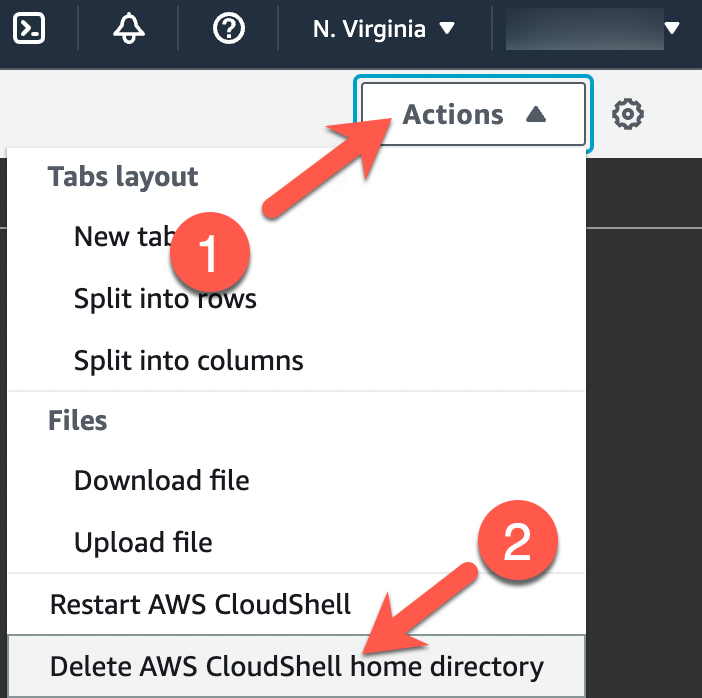
-
When prompted, type
deletein the text field (1) and click on the Delete button (2).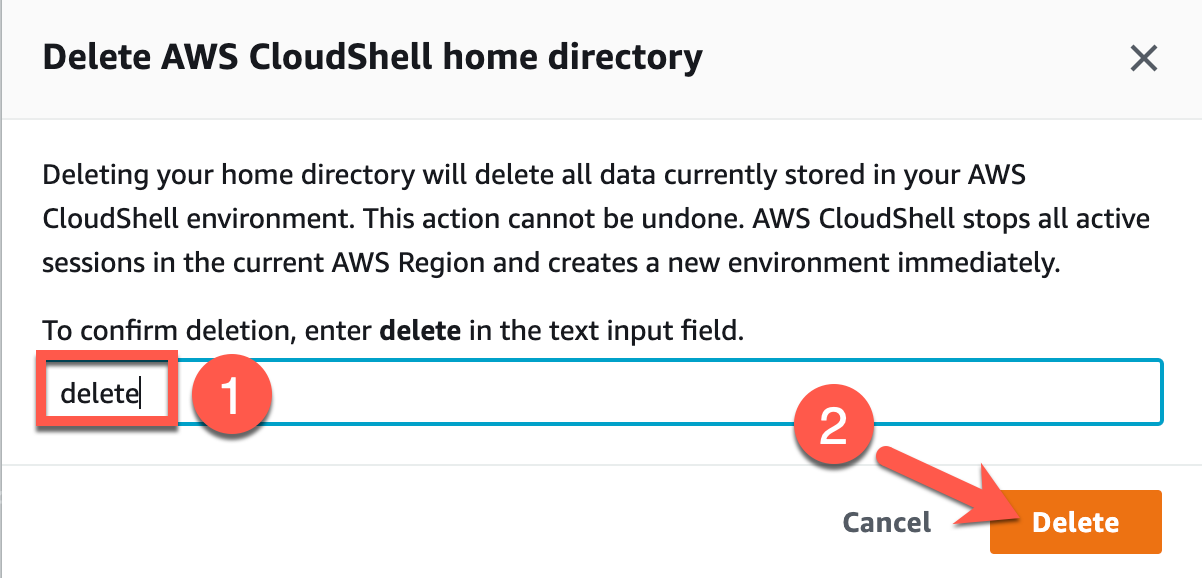
-
Your CloudShell session should restart and your home directory will be set to default.