Exercise 1: Deploying the Serverless Application
Estimated time to complete: 15 minutes
Objectives
- Log into AWS account and launch CloudShell session in the N. Virginia (us-east-1) region.
- Download source code using
gitfrom developer's GitHub repository. - Deploy evidence-app using AWS CloudFormation.
Challenges
Challenge 1: Launch AWS CloudShell
The exercises performed in this workshop are designed to simply use your web browser - no additional tools (e.g., virtual machines, SSH clients) required! Many cloud vendors allow customers to generate a shell session in a vendor-managed container/VM to perform basic tasks. We will use this to our advantage to deploy, test, and analyze an application called evidence-app.
Begin by logging into your AWS account and launch a CloudShell session in the N. Virginia (us-east-1) region.
Solution
-
Navigate to https://console.aws.amazon.com and sign in with either your root user account or an IAM user with AdministratorAccess permissions.
Root User
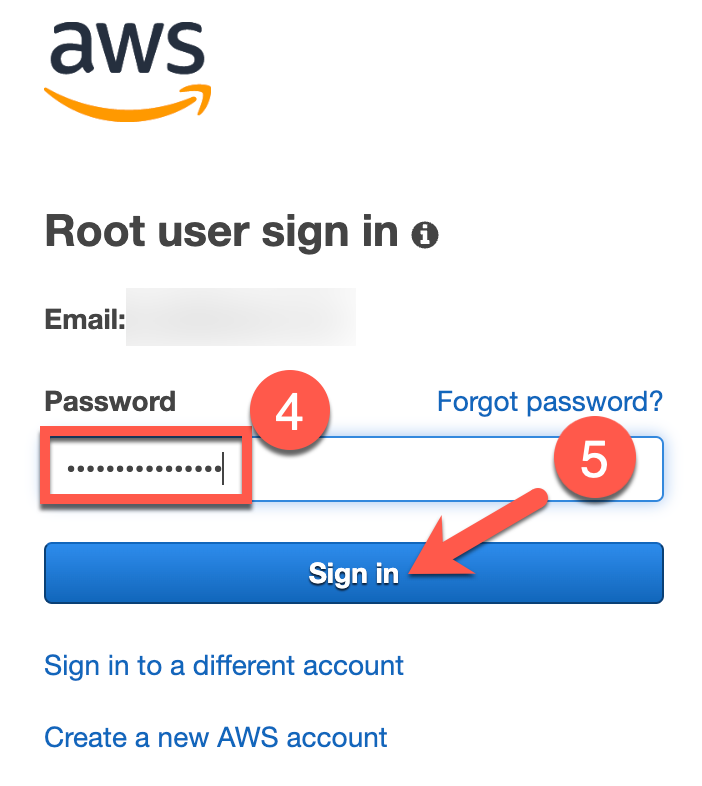
Select the Root user radio button (1), enter your email address used to sign up for AWS in the Root user email address text field (2), and click the Next button (3). On the next page, enter your password in the Password text field (4) and click the Sign in button (5).

IAM User
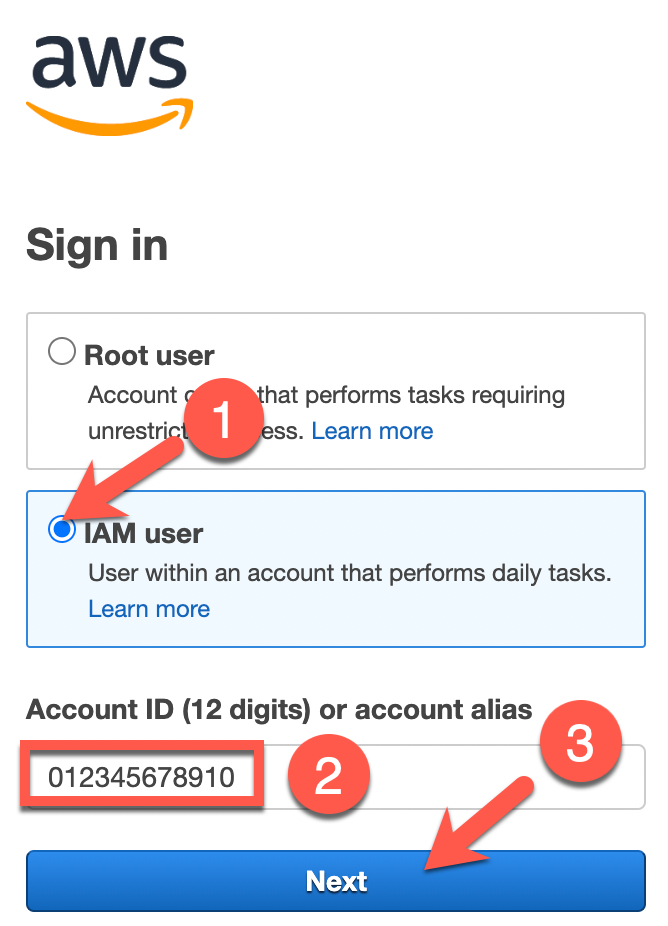
Select the IAM user radio button (1), enter your AWS account number of alias in the Account ID (12 digits) or account alias text field (2), and click the Next button (3). On the next page, enter your IAM username in the IAM user name text field (4), enter your IAM user's password in the Password text field (5), and click on the Sign in button (6).

-
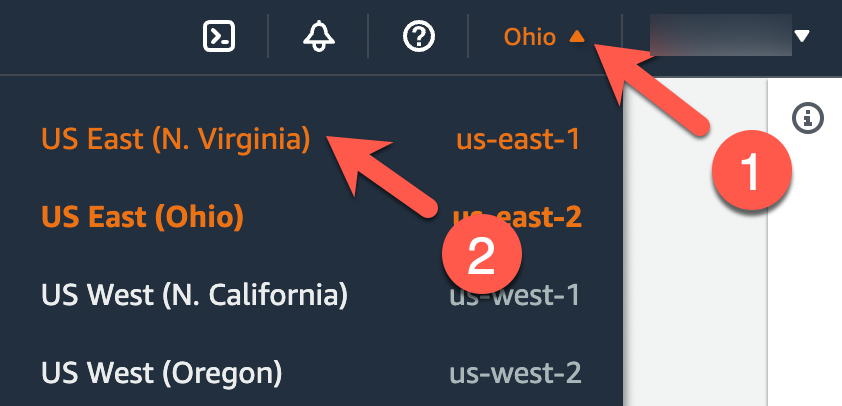
When you arrive at the AWS Management Console, ensure that you are currently interacting with the N. Virginia (us-east-1) region by taking a look at the top-right of the page. You should see N. Virginia. If you see a different region, click the down arrow next to the region's name (1) and select East US (N. Virginia (2).
-
Now that you are interacting with the N. Virginia (us-east-1) region, click on the icon near the top-right that looks like a command prompt to start a CloudShell session.

-
On the next page, you will see a banner that states Waiting for environment to run.... Wait a minute or two until you see a command prompt that looks similar to
[cloudshell-user@ip-10-1-82-127 ~]$(your hostname will vary).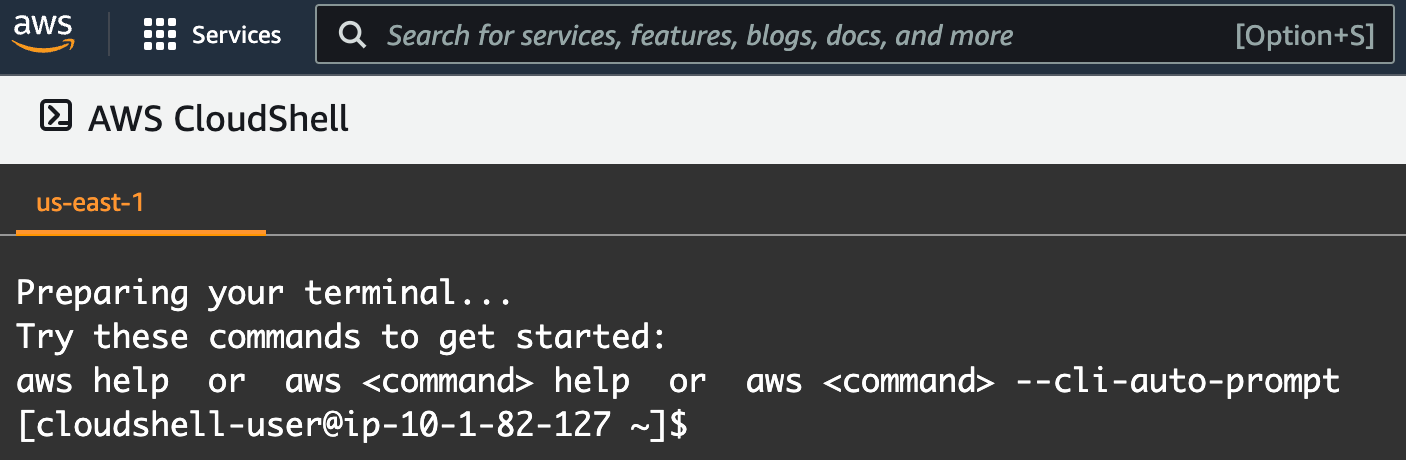
Note
Your CloudShell session will expire after roughly 20 minutes of inactivity. If this happens, simply attempt to type and the session should resume. If this does not work, refresh the page.
Challenge 2: Download Evidence-App Source Code
We need to test the evidence-app in a few different ways: attack the application to uncover any security flaws as part of the organization's Dynamic Application Security Testing (DAST) and also ensure that, if the application were to find its way into production, discover how to identify active threats against the application and its components. You can get started quickly as the application's developers maintain infrastructure as code (IaC) to make the deployment quick and painless.
Now that you are in a CloudShell session, you will need to download the code necessary in order to deploy this application. This code can be found at https://github.com/bluemountaincyber/evidence-app. But how to pull the code down to the session? That's easy! AWS provides git in their CloudShell environment!
Solution
-
Ensure that you are in your CloudShell session's home directory by running the following commands:
cd /home/cloudshell-user
pwd
Expected Result
/home/cloudshell-user -
Use
gitto clone the evidence-app source code.git clone https://github.com/bluemountaincyber/evidence-appExpected result
Cloning into 'evidence-app'... remote: Enumerating objects: 465, done. remote: Counting objects: 100% (74/74), done. remote: Compressing objects: 100% (55/55), done. remote: Total 465 (delta 33), reused 50 (delta 19), pack-reused 391 Receiving objects: 100% (465/465), 17.97 MiB | 30.67 MiB/s, done. Resolving deltas: 100% (239/239), done. -
Ensure that the code downloaded by running the following command:
ls -la /home/cloudshell-user/evidence-app/Expected Result
total 104
drwxrwxr-x 8 cloudshell-user cloudshell-user  4096 Aug 12 18:05 .
drwxr-xr-x 8 cloudshell-user cloudshell-user  4096 Aug 12 18:05 ..
-rw-rw-r-- 1 cloudshell-user cloudshell-user  4986 Aug 12 18:05 api.tf
-rwxrwxr-x 1 cloudshell-user cloudshell-user  1471 Aug 12 18:05 cloudformation-deploy.sh
-rwxrwxr-x 1 cloudshell-user cloudshell-user  1417 Aug 12 18:05 cloudformation-teardown.sh
-rw-rw-r-- 1 cloudshell-user cloudshell-user 13762 Aug 12 18:05 cloudformation.yaml
-rw-rw-r-- 1 cloudshell-user cloudshell-user   935 Aug 12 18:05 compute.tf
drwxrwxr-x 3 cloudshell-user cloudshell-user  4096 Aug 12 18:05 docs
-rw-rw-r-- 1 cloudshell-user cloudshell-user  2087 Aug 12 18:05 evidence.py.tpl
drwxrwxr-x 8 cloudshell-user cloudshell-user  4096 Aug 12 18:05 .git
-rw-rw-r-- 1 cloudshell-user cloudshell-user   181 Aug 12 18:05 .gitignore
-rw-rw-r-- 1 cloudshell-user cloudshell-user  4846 Aug 12 18:05 iam.tf
-rw-rw-r-- 1 cloudshell-user cloudshell-user   232 Aug 12 18:05 main.tf
-rw-rw-r-- 1 cloudshell-user cloudshell-user   146 Aug 12 18:05 outputs.tf
drwxrwxr-x 3 cloudshell-user cloudshell-user  4096 Aug 12 18:05 presentation
-rw-rw-r-- 1 cloudshell-user cloudshell-user  3757 Aug 12 18:05 README.md
drwxrwxr-x 2 cloudshell-user cloudshell-user  4096 Aug 12 18:05 scripts
-rw-rw-r-- 1 cloudshell-user cloudshell-user  2863 Aug 12 18:05 storage.tf
-rw-rw-r-- 1 cloudshell-user cloudshell-user    68 Aug 12 18:05 variables.tf
drwxrwxr-x 2 cloudshell-user cloudshell-user  4096 Aug 12 18:05 webcode
drwxrwxr-x 3 cloudshell-user cloudshell-user  4096 Aug 12 18:05 workbook
Challenge 3: Deploy Evidence App
Finally, you have all of the components needed to deploy the application in your AWS account.
Use cloudformation-deploy.sh to deploy the IaC. Afterwards, navigate to the website created by this IaC.
Solution
-
Before you can deploy resources using the
cloudformation-deploy.shscript, you must be in the current directory where those files reside. Navigate to/home/cloudshell-user/evidence-app.cd /home/cloudshell-user/evidence-app pwdExpected Result
/home/cloudshell-user/evidence-app -
Run the
cloudformation-deploy.shscript and, after roughly 5 minutes, you should see a URL for your evidence app../cloudformation-deploy.shSample Result
Deploying CloudFormation Stack... Creating DynamoDB entry... Adding webcontent to S3... Complete! Evidence-App URL: https://d2x6hc15286uu2.cloudfront.net -
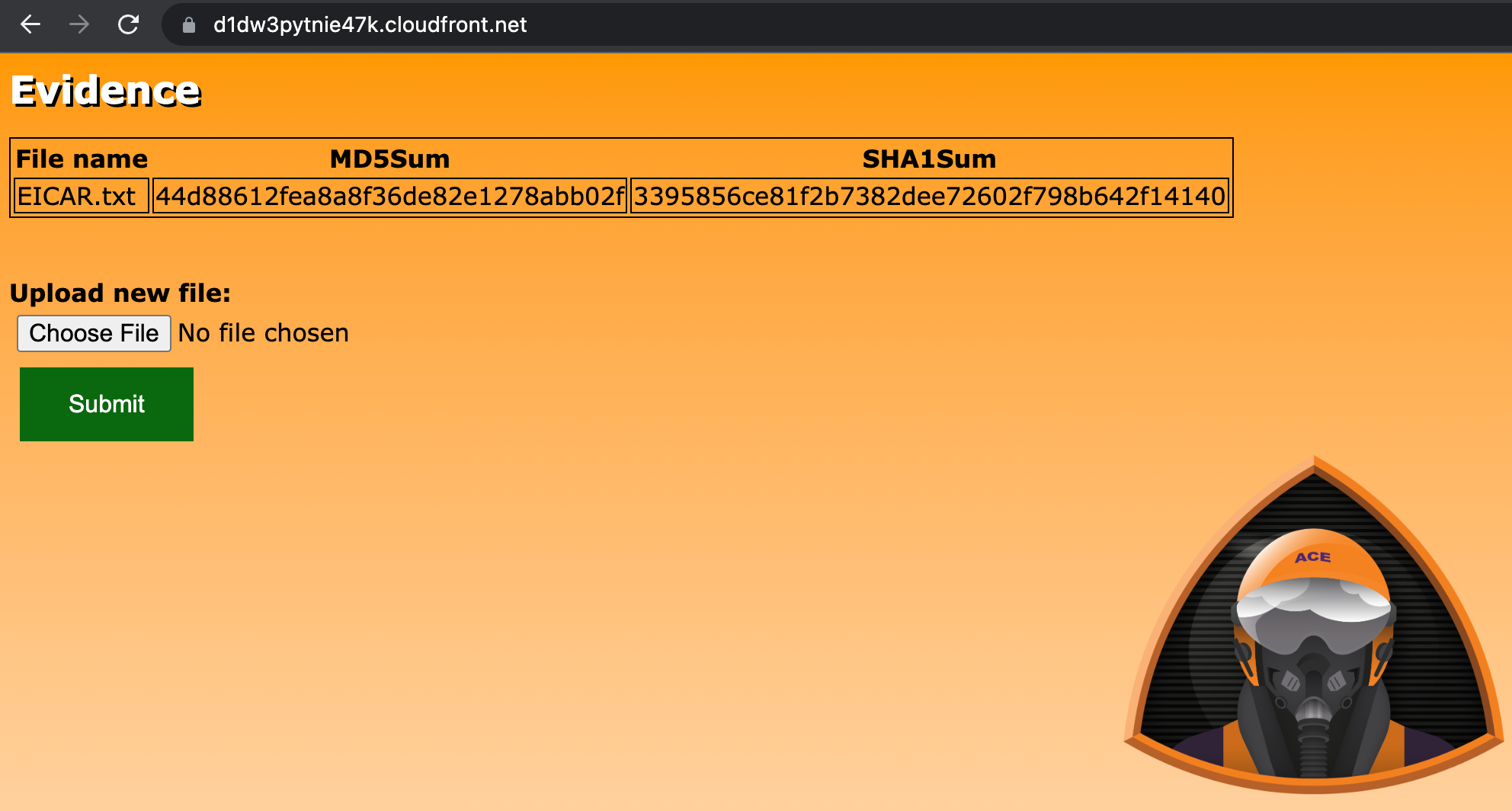
If you notice the last line of the output, this is the URL of the evidence-app that you will be testing. Isn't that nice of the developers to make this URL easy to find? Navigate to this URL in another browser tab to see what we are dealing with.
-
The application that you are looking is described in the source code repository's README.md file.
README.md excerpt
This serverless web application is used by Sherlock's blue team to import evidence data, generate MD5 and SHA1 hashes of the uploaded files, and save the files in a safe location.